
If you have more than one location, you can set up separate billing for each one.
IMPORTANT NOTES:
→ once you switch to location-level billing, you won’t be able to go back to company-level billing and you will need to add a credit card for each location including your original location. If you need to switch back, please email support@clickBACON.com
→ when you switch between company and location level billing, connections to your QuickBooks Online and R365 may be affected and will require you to reconnect. Please double check!
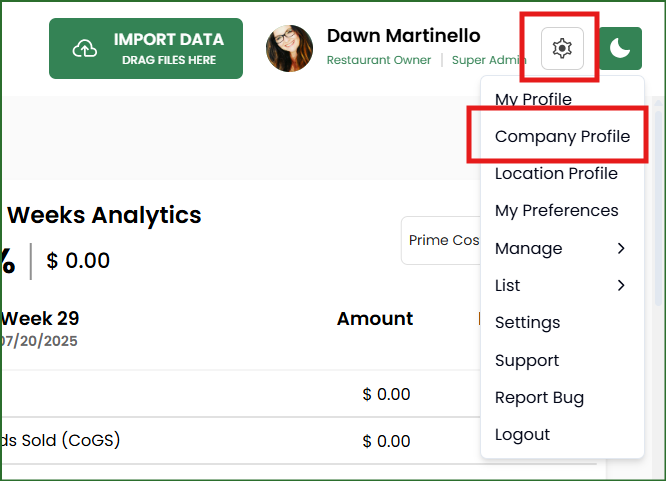
1. Click on the gear icon and then COMPANY PROFILE.
2. Scroll down to MORE OPTIONS and change your billing scope to LOCATION.

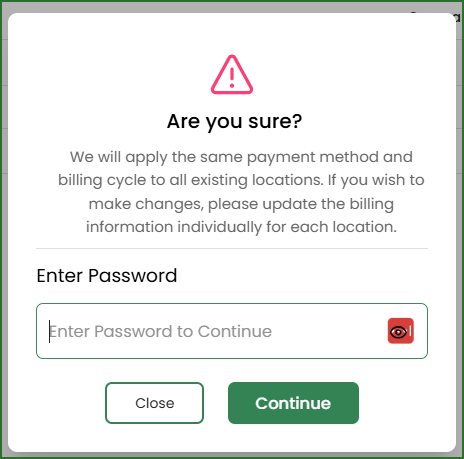
3. Confirm your action by entering your password.
REMINDER: you cannot undo this action. Once you choose location level billing you will not be able to revert to company level billing.
4. Go into each location (including your original!) and enter a new credit card.
You can access each location by choosing the correct one from the drop down and then click on the gear icon and then Location profile. You will need to re-enter your payment information for the current location as well.
For any future locations you add, you will be required to choose a plan and add a credit card.